

DMX Core PoE Control
Knobs and buttons on the wall, one Ethernet cable, nothing to program.
DMX Core PoE Control is a small wall-mountable box that turns rotary encoders and push buttons into control of a DMX Core 100, of a Symetrix or Q-SYS DSP directly, or of anything Bitfocus Companion can reach. A single cable from a PoE switch carries both power and control.
With a DMX Core 100: turn a knob and a level on the Core moves - the master dimmer, a zone, a fixture channel, the audio volume. Press it, or a button, to play a cue, apply a preset, blackout or mute. What each knob drives is a dropdown on the Core, not a firmware change.
With a Symetrix or Q-SYS DSP: load the Symetrix or Q-SYS firmware, give it the DSP's address, and each knob nudges a fader by controller number or control name over the DSP's own control protocol. The push mutes; buttons recall presets or fire triggers. No DMX Core 100 needed - a proper PoE wall knob for a DSP room, with your choice of knob and panel.
Either way the Core or the DSP owns the value and the knob only sends steps, so there is nothing to drift, nothing to re-sync and nothing to lose in a power cut. The same level shows on every other control surface.
With Bitfocus Companion: load the Companion firmware, give it Companion's address, and the unit appears in Companion as a surface, the way a Stream Deck does. Each knob and button is a key on Companion's Buttons page - a knob's turn is the key's rotary action, its push the press - and what each key does, across the hundreds of devices and programs Companion talks to, is set up in Companion. A wall knob for Companion with no computer at the wall.
With anything else that takes OSC: a knob can step a server's own up and down addresses, or keep a level of its own and send it as a number - for mixers, media players and lighting desks. Buttons send any OSC address.
Four control ports. Each pluggable screw terminal takes one rotary encoder with a push switch, or up to three push buttons, in any mix. Use our Rotary Encoder Kit or any standard encoder or button; the wiring is passive and every input line is protected against ESD and miswiring. A separate port drives up to eight addressable RGB panel LEDs.
Configured from a browser, or from a text file. Once it is on the network, open its web page - it announces itself, so the address is just its name - to see its status live, edit its settings, read its log and upload firmware updates. Nothing on the wall needs touching, ever. The settings are one plain text file with every option explained in it, and the same file is on a small USB-C drive the unit presents when plugged into a computer, for the first setup or for a network that is locked down. Give the web page a password, or turn it off altogether for a unit that must only be reachable through its USB port. Firmware updates, from the page or the drive, install on trial and roll back on their own if the new firmware does not start.
Works with every DMX Core 100. It talks OSC over the network, which the Core has built in whether it runs on the dedicated hardware or as software on Windows, macOS or Linux. Nothing else to install or enable. Switching a unit between DMX Core, Symetrix, Q-SYS and Companion is a firmware file uploaded on its web page or copied onto its drive.
Specifications
- Ethernet 10/100, PoE IEEE 802.3af (Class 0); or USB-C 5 V; about 1 W
- 4 control ports, 3.5 mm pluggable screw terminals: encoder (A, B, push) or up to 3 buttons per port
- Panel LED port: up to 8 WS2812-compatible RGB LEDs
- Targets: DMX Core 100 or any OSC server (OSC); Symetrix DSPs (Composer control protocol); Q-SYS Cores (External Control Protocol); Bitfocus Companion (Satellite protocol). One firmware image per target, all included
- Knobs: step a Core Control Value; step or set a level on any OSC server; nudge a Symetrix controller or a Q-SYS named control by a set percent per click; a rotary action per click on a Companion key
- Push and buttons: any OSC address, one-shot or momentary (Core); toggle, set, momentary, pulse, preset (Symetrix); toggle, set, momentary, trigger, snapshot (Q-SYS); a key press in Companion
- DHCP or fixed IP; finds the Core by name (mDNS), or connects to the DSP's or Companion's IP address
- Built-in web page: live status, settings editor, log, firmware upload, restart; optional password; can be switched off
- USB-C configuration drive with the same settings file, status file and drag-and-drop firmware updates
- RGB status LED, hardware watchdog
- RP2350 microcontroller, W5500 Ethernet, isolated PoE module
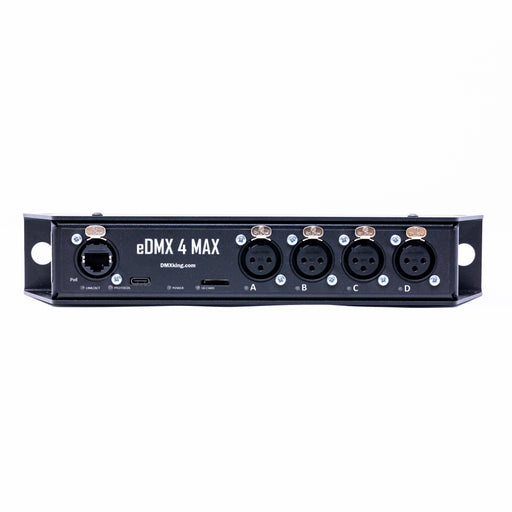
- Wall-mountable enclosure with mounting ears, about 91 x 72 x 29 mm
- Indoor use, 0 to 40 °C
In the box
- DMX Core PoE Control in its enclosure
- Four control-port plugs and one LED-port plug
Knobs and buttons are not included: add the Rotary Encoder Kit, one per knob, or use your own. Requires a DMX Core 100 (hardware or software), a Symetrix DSP, a Q-SYS Core or Bitfocus Companion, and a PoE switch or injector, or a USB-C power supply.
Documentation: https://docs.dmxcore.com/dmx-core-poe-control